GWEIKE G2 Max 50W Fiber Laser Engraver vs Monport 30W JPT MOPA Fiber Laser
Head-to-head spec comparison to help you pick the right fiber laser for your needs.
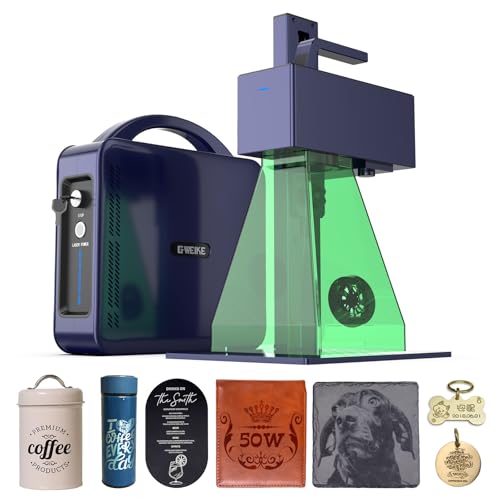
GWEIKE
$2,499
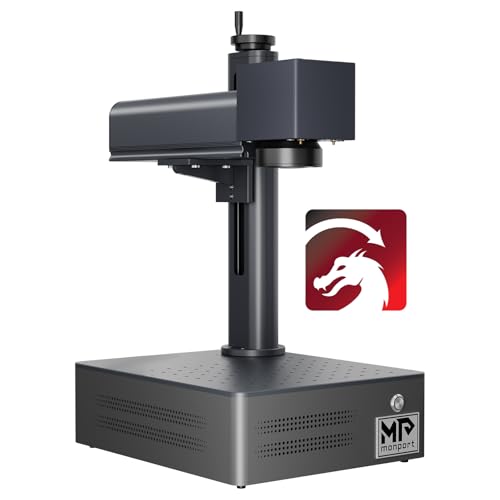
Monport
$2,899.99
Spec-by-Spec Comparison
| Spec | GWEIKE G2 Max 50W Fiber Laser Engraver | Monport 30W JPT MOPA Fiber Laser |
|---|---|---|
| Wattage | 50 W | 30 W |
| Laser Type | Q-Switched | MOPA |
| Laser Source | Raycus | JPT |
| Work Area (W) | 150 mm | 175 mm |
| Work Area (H) | 150 mm | 175 mm |
| Galvo Speed | 15000 mm/s | 8000 mm/s |
| Color Marking | Yes | Yes |
| LightBurn | Yes | Yes |
| Autofocus | No | No |
| Weight | 6.5 kg | 4 kg |
| Software | LightBurn + EZCad | BSLcad + LightBurn (galvo license required separately) |
| Pulse Width | N/A (Q-Switched, 20–200kHz frequency range) | 2–500ns |
| Price | $2,499 | $2,899.99 |
| Rating | 7.8/10 | 7.2/10 |
| Buy on Amazon | Buy on Amazon |
Pros & Cons
GWEIKE G2 Max 50W Fiber Laser Engraver
Pros
- 50W Raycus fiber at 15,000mm/s is the highest wattage-speed combination in this price bracket — deep engraving to 5mm on metal is a documented standout capability no 30W machine at any price matches
- GWEIKE's LightBurn driver is the most actively maintained of any Chinese fiber laser brand — after the initial x/y axis calibration, LightBurn integration runs without the COR file gymnastics that ComMarker requires
- 150×150mm work area with 50W handles large plaques, long knife blades, and production batch runs on a single setup
- Active LightBurn settings ecosystem with a 37-material community settings pack (Etsy) specific to the G2 Max 50W covering metals, plastics, and stone
- 6.5kg portable form factor with detachable laser head — the same lightweight chassis as the G2 Pro 30W, not the heavy industrial frame you would expect at 50W output
Cons
- NOT a MOPA laser — earlier specs on this site incorrectly listed it as MOPA/JPT; it is a Raycus Q-switched fiber laser; no controllable pulse width, no MOPA-quality color marking libraries
- Calibration out of box requires x/y axis swap in LightBurn — documented by a verified owner (machinesformakers.com, Sep 2025); not a defect but a configuration step GWEIKE's documentation does not explain
- Compare this 50W Q-switched configuration with current 60W MOPA offers by exact source, field, controller, and workflow rather than expired prices
- Color marking is thermal oxidation, not MOPA — achievable on stainless and titanium with tuning but less consistent and less repeatable than a JPT MOPA; best-lasercutter.com explicitly notes this limitation
- No enclosure, no autofocus, and documentation rated poor by multiple owners — 50W Class 4 open-beam requires full PPE and a controlled workspace from day one
Monport 30W JPT MOPA Fiber Laser
Pros
- The current title identifies a 30W JPT MOPA configuration with BSLcad and LightBurn references; verify the exact controller and bundle before buying
- JPT MOPA source with 2–500ns variable pulse width — the physics required for oxide-layer color marking on stainless steel are present; this is confirmed hardware, not a marketing claim
- BSLcad bundled with LightBurn galvo support available — not EZCad2; buyers from diode lasers can continue a LightBurn workflow (galvo license purchased separately)
- 30W output handles deep engraving on stainless, aluminum, and brass in fewer passes than any 20W Q-switched alternative
- Color marking on stainless, titanium, and anodized aluminum is achievable once settings are dialed — a capability this price tier has no business offering
Cons
- MOPA settings are not plug-and-play — frequency, pulse width, and power interact in non-obvious ways; one Reddit owner described the transition from CO2 as 'feeling like I've never used technology before' after buying a Monport MOPA
- No material parameter library for BSLcad exists in any community channel — unlike OMTech or ComMarker, no Etsy settings packs or forum parameter threads exist for this specific machine
- Monport's documentation rated 'horrible' for galvo setup by experienced fiber users — expect several hours of calibration before achieving first successful color mark
- The current Amazon title states a 6.9×6.9-inch work area; confirm the exact lens and usable field with the seller before checkout
- Very thin review base — this is a recent Amazon listing; no volume of owner feedback exists to verify factory QC or consistency across units
Our Verdicts
GWEIKE G2 Max 50W Fiber Laser Engraver
The GWEIKE G2 Max 50W is a Q-switched, 50W configuration for buyers prioritizing engraving speed over MOPA pulse control. The verified Amazon offer was $2,499 on July 10, 2026. Compare it against current 60W MOPA offers by exact source, controller, work area, and support rather than the expired $1,199 comparison.
Monport 30W JPT MOPA Fiber Laser
The Monport 30W MOPA is relevant to experienced operators who need variable pulse-width control and are prepared for thin BSLcad-specific documentation. The verified Amazon offer was $2,899.99 with limited stock on July 10, 2026, not $599. At that price, compare support, controller, lens, work area, and return terms against other available MOPA configurations before buying.