ComMarker B4 30W Fiber Laser Engraver vs GWEIKE G2 Pro 30W Fiber Laser Engraver
Head-to-head spec comparison to help you pick the right fiber laser for your needs.
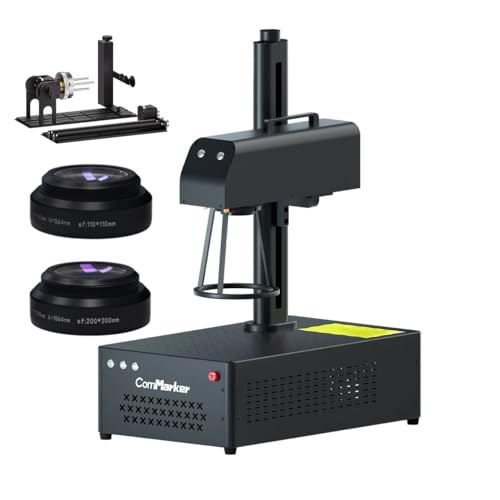
ComMarker
$1,799
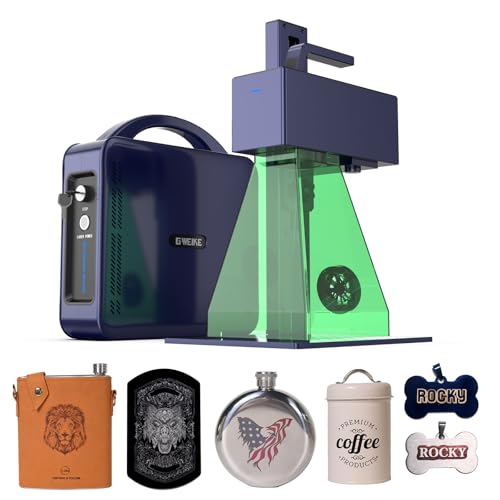
GWEIKE
$1,799
Spec-by-Spec Comparison
| Spec | ComMarker B4 30W Fiber Laser Engraver | GWEIKE G2 Pro 30W Fiber Laser Engraver |
|---|---|---|
| Wattage | 30 W | 30 W |
| Laser Type | Q-Switched | Q-Switched |
| Laser Source | Raycus | Raycus |
| Work Area (W) | 110 mm | 150 mm |
| Work Area (H) | 110 mm | 150 mm |
| Galvo Speed | 10000 mm/s | 15000 mm/s |
| Color Marking | No | Yes |
| LightBurn | Yes | Yes |
| Autofocus | No | No |
| Weight | 4.2 kg | 6.5 kg |
| Software | LightBurn + EZCad2 (LightBurn Galvo license required separately) | LightBurn + EZCad2 |
| Pulse Width | N/A (Q-Switched) | N/A (Q-Switched, 20–200kHz frequency range) |
| Price | $1,799 | $1,799 |
| Rating | 8.2/10 | 8.3/10 |
| Buy on Amazon | Buy on Amazon |
Pros & Cons
ComMarker B4 30W Fiber Laser Engraver
Pros
- The broader product evidence describes 110mm and 200mm lens options; verify which lenses are included in the exact current ASIN bundle
- Motorized electric Z-axis lifting reduces manual focus adjustment; verify the current controller and lift configuration with the seller
- LightBurn compatible with EZCad2 also included — both workflows supported; owners report LightBurn produces dramatically better deep engraving results than EZCad2 on this machine
- Deep engraving on aluminum, brass, steel, precious metals, and stone confirmed across multiple owner channels — 30W Raycus output handles production-depth marking reliably
- Handheld mode via detachable design — for large pieces or on-site marking that won't fit on the desktop platform, this is a workflow no other machine in this tier offers
Cons
- Q-switched only — no color marking on stainless steel; if color is needed, the separate B4 30W MOPA (ASIN B0DRY12JMW) has the JPT MOPA source; both use the B4 body but they are different machines
- LightBurn may require a separate Galvo license; confirm controller compatibility and licensing before checkout
- Initial LightBurn setup requires loading a markcfg7 config file and calibrating corfile field size for whichever lens is mounted — LightBurn forum threads show first-time owners spending hours on initial configuration
- No color marking — reinforcing the most important caveat: despite 'B4' appearing in ComMarker's MOPA lineup branding, this specific ASIN is the Raycus Q-switch variant; verify the ASIN if color marking is needed
- Customer support response is 24hr+ with documented language barriers — not viable for time-sensitive production downtime per LightBurn forum users
GWEIKE G2 Pro 30W Fiber Laser Engraver
Pros
- The current title carries a 15,000mm/s speed claim; compare real-job evidence and controller settings before inferring production throughput
- Wide 20–200kHz frequency range enables thermal oxidation color on stainless steel and titanium — GWEIKE documents '90+ colorful engravings' and DIY Life reviewer confirmed distinct greens and reds on stainless (Nov 2024)
- GWEIKE's LightBurn driver is the most actively maintained of any Chinese fiber laser brand — no COR file gymnastics, no galvo axis swap workarounds; direct native LightBurn galvo support out of box
- 150×150mm work area handles most knife blades, tumblers with rotary, and medium plaques without repositioning
- Active LightBurn settings ecosystem with documented community resources: a dedicated Etsy seller offers a 37-material LightBurn library specific to the G2 Pro 30W covering metals, plastics, and stone
Cons
- Color marking is thermal oxidation, not MOPA — results require experimentation per material and are less consistent and repeatable than a JPT MOPA machine; do not expect plug-and-play stainless color
- Focus height calibration is measured from lens center, not machine frame — GWEIKE's manual doesn't clarify this; every new owner mis-sets focus initially and must recalibrate by sound and burn quality (LightBurn forum, Feb 2026)
- Customer service is WhatsApp-only with inconsistent quality — best-lasercutter.com rates it 'a gamble'; not viable for production-critical environments with tight turnaround requirements
- The built-in fan is not a substitute for a verified fume-control plan appropriate to the marked material and workspace
- Native G-Laser software is frustrating and feature-poor — nearly all users switch immediately to LightBurn; do not evaluate the machine on G-Laser
Our Verdicts
ComMarker B4 30W Fiber Laser Engraver
The ComMarker B4 30W is a Q-switched option for buyers prioritizing metal-marking speed and the included lens choices over MOPA pulse control. The verified Amazon offer was $1,799 on July 10, 2026. The OMTech ASIN referenced in older comparisons was out of stock, so compare this machine only with currently available, exact configurations.
GWEIKE G2 Pro 30W Fiber Laser Engraver
The GWEIKE G2 Pro is a fast Q-switched option with a 150mm field and an extended frequency range. The verified Amazon offer was $1,799 on July 10, 2026, so the old under-$900 comparison is invalid. Buyers focused on repeatable MOPA workflows should compare available true-MOPA configurations rather than the currently unavailable OMTech ASIN referenced in older copy.